SkyCam

Last image filename: 00003050.FIT
Exposure started: 2019-12-09T07:12:33.859 UTC
Exposure time: 10 seconds
A complete list of uploaded images can be found in the image file history. See the test page for details about the image info.
The SkyCam project uses an automated camera system to periodically record images of the entire sky from dusk until dawn. These images will be incorporated into other learning projects that include real-time scientific data as dynamic curricular content. It is intended that this will be a resource for instructors that don't have access to astronomical equipment and will provide a richer learning experience for students working with the materials.[1]
Possible topics to be covered include meteorology (cloud cover or haze), detecting transient phenomena (meteors or orbiting satellites), measuring sky brightness (to monitor light pollution), and possibly measuring light curves for brighter variable stars.
An all-sky camera has been installed on the roof of Ladd Observatory at the Department of Physics, Brown University. This project will document the setup, configuration and operation of the camera. It will also show examples of how these images could be used.
The image at the top of this page is an example of dynamic inclusion of content. A computer program automatically uploads a new image and updates the caption each night. Depending on the local weather the image could be overexposed due to thick cloud cover illuminated by city street lights or it might show stars. On rare occasions you might see a meteor. Visit again tomorrow to view a new image.
In all of these images: north is at right, west is at bottom, and the zenith is at center. The image covers a very wide view of the sky. It is similar to what you would see lying on the ground looking straight up.
Prior work[edit | edit source]
The Night Sky Live project[2] was a network of all sky cameras (called CONCAM for CONtinuous CAMera) used to take images of the entire sky all night long. The cameras were permanently mounted at a number of astronomical observatories. It is not known if any of these are still operational.
Night Sky Live camera locations.[3]
|
The images were then analyzed using this software and the data was made freely available for scientific and educational use. This data was then used in the analysis of meteor trails to provided information regarding meteor atmospheric trajectories.[4] It was also used to capture and characterize optical transients.[5] The Night Sky Project is no longer active as of 2007, see State of the Night Sky Live Project. Some camera sites continued to operate after that date. Below are some images from the network. The bright streak in the image from Mauna Kea is a fireball from the Leonids meteor shower.
Night Sky Live images[edit | edit source]
Example CONCAM images from The Night Sky Live network. The long bright streak in the last image is a fireball from the Leonids meteor shower.
-
 Canary Islands, Spain
Jan. 1, 2008
23:55:36 UTC
180 seconds -
 Canary Islands, Spain
Jan. 28, 2008 UTC
20:14:56
180 seconds -
 Mauna Kea, Hawaii
Nov. 18, 2001 UTC
10:12:57
180 seconds


Installation[edit | edit source]
 | |
| Organization | Brown University Physics |
|---|---|
| Location | Providence, Rhode Island, US |
| Altitude | 226 feet (69 m) |
| Weather | See the Clear Sky Chart |
| Established | October 21, 1891 |
| Website | http://brown.edu/ladd |
| Blog | http://blogs.brown.edu/ladd |
| Social media | |
| LaddObs | |
| LaddObs | |
| Wikimedia | |
| Commons | Ladd Observatory |
| Outreach | Ladd Observatory |
| Wikipedia | Ladd Observatory |
| Authority control | |
| Wikidata | Q6469295 |
| Schedule | |
| Open Tuesday nights, weather permitting. | |
| Map | |
 | |
The Night Sky Live CONCAM installations were very expensive which caused some observatories to seek lower cost alternatives.[6] This projects describes one such low cost alternative installed at the Ladd Observatory.
The camera is located in an urban environment where there are many street lights and other sources of light pollution. The camera is very sensitive and will produce overexposed images of the full moon. The camera can not be used during the daytime for this reason. It is important to mount the camera in a location where there is no direct artificial light which could wash out the details of dim astronomical sources such as meteors. The camera was mounted adjacent to the observatory dome, but great care was taken to prevent the dome from appearing in the field of view of the camera. Light from the sky (street light scattered from clouds) would reflect off the dome and degrade the image quality. This would also cause problems with the auto-contrast adjustment feature of the camera control software.
The camera system used here is a commercial off-the-shelf product manufactured by Santa Barbara Instrument Group. It includes a weatherproof housing with a window that is heated to prevent condensation. The window is an optical filter that transmits light from 630 - 1000 nm (red to near infrared) and is used to block light pollution. Inside is an ST-402ME digital imaging camera which uses a monochrome 16 bit per pixel Kodak KAF-0402ME CCD chip with 9 micron pixel size. The camera body is mated to a Computar fisheye lens that gives a wide-angle view of the sky. It has a 2.6mm focal length and a 1.6 focal ratio. The field of view is about 140 x 90 degrees. The camera described here is no longer manufactured; it has been replaced by the SBIG AllSky 340 Cameras. In 2017 the list price for this new model was US$ 2,500.
The camera is connected to a personal computer running Microsoft Windows with the CCDSoft camera control software from Software Bisque. A Visual Basic script turns the camera on at dusk and begins taking images every 10 seconds until dawn. The raw images are saved in the Flexible Image Transport System (FITS) format for later analysis. During a typical night this results in some 3,000 to 4,000 images, depending on the length of the night which varies by season. The total amount of uncompressed data is about 2 to 3 GB per night. Every 5 minutes the latest image is auto-contrast adjusted to compensate for a wide range of sky brichtness conditions. It is then converted to a compressed JPEG file which is immediately uploaded to a web server along with a text file containing the time-stamp and other information about the image. An Internet bot called Mu301Bot then copies one image per night to Wikiversity using the pywikibot Python library and scripts.
Maintenance of the camera is minimal. The top cover of the weather resistant enclosure has a slight tilt. When it rains the drops slide off to remove dust and pollen from the window that the camera views the sky through. No hardware repairs have been needed. The software occasionally must be restarted due to memory leaks or lack of disk space. The quality of the images has slowly degraded over the course of a decade. A number of defective pixels which are brighter than others can now be seen in the images.
Equipment images[edit | edit source]
-
 The sky camera mounted near the dome on the roof of the observatory
 -
 The sky brightness meter (white cylinder) and sky camera (grey box)


Testing[edit | edit source]
First images (2008)[edit | edit source]
The images below show some of the first test images taken in April 2008 before the camera was permanently installed. The camera was placed on a table on the rooftop deck of the observatory. The first image is of the observatory. The building appears distorted due to the fisheye lens which is used to capture a very wide field of view. The next two images capture the sky and also a portion of the building including the fireplace chimney and dome.
-
 7 April 2008
 -
 17 April 2008
01:08:09 UTC -
 18 April 2008
01:21:16 UTC


Leonids images (2010)[edit | edit source]
A series of images were taken during the morning of the 2010 Leonids. The sky was relatively clear and dark.
The meteors appear as a short and thin trail (or streak) as they move during the time exposure. Click on an image to open a larger view to more easily them.
-
 18 November 2010
09:28:24 UTC -
 18 November 2010
09:32:42 UTC


The camera was then mounted on the roof of Ladd Observatory on Dec. 13, 2010.
Quadrantids images (2011)[edit | edit source]
A series of images were taken during the early morning of the 2011 Quadrantids. There was a large amount of water vapor in the atmosphere. The camera is very sensitive to city lights reflected off of atmospheric moisture.
The meteors appear as a short and thin trail (or streak) as they move during the time exposure. Click on an image to open a larger view to more easily them.
-
 4 January 2011
04:45:20 UTC -
 4 January 2011
05:06:43 UTC -
 4 January 2011
06:12:35 UTC


Quadrantids images (2012)[edit | edit source]
Another series of images were taken during the early morning of the 2012 Quadrantids.
The meteors appear as a bright trail (or streak) as they move during the time exposure.
-
 4 January 2012
08:00:08 UTC -
 4 January 2012
09:44:02 UTC


Examples[edit | edit source]
Full view images[edit | edit source]
This section shows sample images and how to interpret the features in them.
-
 Overexposed image of completely overcast sky
 -
 Mostly cloudy
 -
 Scattered clouds with some stars
 -
 The Moon at upper left and Lens flare
 -
 CCD blooming caused by the overexposed Moon
 -
 A very bright fireball meteor and Mars
 -
 Raindrops on camera window
 -
 Distortion due to a water drop on the camera window


Details from images[edit | edit source]
This section shows details from the images highlighting unusual features seen in the images. This includes transient phenomena including orbiting satellites and meteors. Also included are image artifacts due to the camera or sky conditions.
-

-
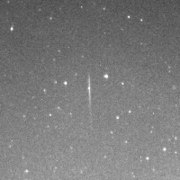 Small meteor
Leonids (2010) -
 Bright meteor
Quadrantids (2012) -
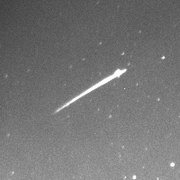 Bright meteor and Mars
Quadrantids (2012) -
 A fireball and Mars
(2012) -
 Closeup of image distortion from a small water droplet


Other uses[edit | edit source]
The software pipeline used by the Sky Camera can also capture a series of images of notable events such as an eclipse or the Transit of Mercury. A different camera attached to a telescope shows a magnified view of the object. The images can then be repeatedly uploaded to a webserver. Other types of scientific data such as sky brightness measurements or meteorology data can also be handled.
Telescope images[edit | edit source]
A series of images were taken in preparation for a lunar eclipse in 2014.[1] The skies were cloudy, so the eclipse was not visible. Images were taken during the 2017 solar eclipse which were immediately available on a webserver.[2] The weather was partly to mostly cloudy. This caused problems for the auto-contrast feature of the software. Otherwise, the event was a success. During this live stream there were 68,219 downloads during the day. The images were also widely shared on social media.
-
 4 November 2014
01:27:18 UTC
0.005 seconds -
 21 August 2017
18:47:05 UTC
0.001 seconds


Resources[edit | edit source]
Real-time webpages from which this project retrieves data:
- Ladd Observatory: Sky Camera - Current SkyCam image updated every 5 minutes. (Only during the night, US eastern time zone.)
- Ladd Observatory: Sky Brightness Monitor - Sky brightness meter graph updated every 2 minutes. (Only during the night, US eastern time zone.)
The data is automatically uploaded by a bot to these pages:
Subpages of this project:
Images files.

- Wikiversity:File:Mu301test.jpg - see revision history of image file for current test.
- Commons:File:Mu301test.jpg - see revision history of image file for 2016 test.

See also[edit | edit source]
 Whole sky camera
Astronomical survey
References[edit | edit source]
- ↑ Grady, C.A.; Farley, N.; Zamboni, E.; Avery, F.; Clark, B.; Geiger, N.; Woodgate, B. (2003). "Accessible Universe: Making Astronomy Accessible to All in the Regular Elementary Classroom". Astronomy Education Review 2 (2): 1–19. doi:10.3847/AER2003014.
- ↑ Pérez-Ramírez, D.; Nemiroff, R. J.; Rafert, J. B. (October 2004). "nightskylive.net: The Night Sky Live project". Astronomische Nachrichten 325 (6–8): 568–570. doi:10.1002/asna.200410292.
- ↑ Shamir, L.; Nemiroff, R. J. (August 2005). "All‐Sky Relative Opacity Mapping Using Nighttime Panoramic Images". Publications of the Astronomical Society of the Pacific 117 (835): 972–977. doi:10.1086/432689.
- ↑ Shamir, L. (June 2005). "Analysis of meteor trails using the Night Sky Live network of panoramic CCD cameras". Journal of the International Meteor Organization 33 (3): 75–80. https://ui.adsabs.harvard.edu/abs/2005JIMO...33...75S.
- ↑ Shamir, L.; Nemiroff, R. J. (July 2006). "OT 060420: A Seemingly Optical Transient Recorded by All‐Sky Cameras". Publications of the Astronomical Society of the Pacific 118 (846): 1180–1185. doi:10.1086/506989.
- ↑ Gully-Santiago, Michael (December 2006). "The McDonald Observatory Skycam Project". Bulletin of the American Astronomical Society. AAS/AAPT Joint Meeting. Vol. 38. p. 1108. Bibcode:2006AAS...20915403G.
Unfortunately its $100,000 price tag makes similar systems largely inaccessible to most observatories.
- Sky Camera posts at the Ladd Observatory blog
External links[edit | edit source]
- NASA All-sky Fireball Network
- JATObservatory Meteor Cam
- AllSkyCam.com
- How to make a simple all-sky camera
- CAM - an automated video surveillance of the night sky to validate the IAU Working List of Meteor Showers.
- All Sky Meteor Camera - NASA blog
- AMS Member Cameras American Meteor Society camera list.